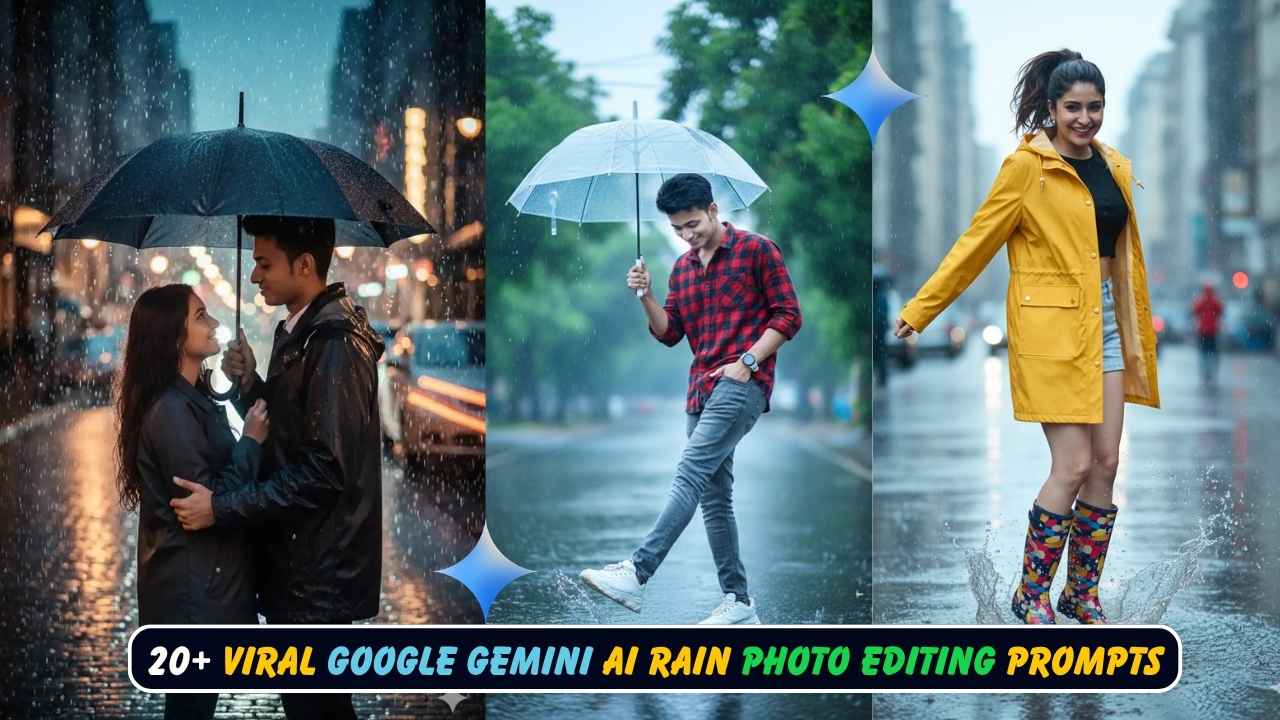
Rainy photo edits have taken social media by storm in 2025, adding mood, depth, and cinematic flair to ordinary selfies and portraits. Google Gemini AI makes it incredibly easy to transform your photos into stunning monsoon masterpieces that capture the magic of rain—perfect for Instagram reels, viral posts, and creative portfolios. Whether you want a romantic rain-soaked street scene, a moody portrait with dramatic lighting, or a playful umbrella moment, these AI prompts let you create professional-quality rainy images while preserving your 100% real face. No complex editing skills required—just copy, paste, and watch your photos come alive with the beauty of rain.
20+ Viral Google Gemini Rainy Photo Editing Prompts (100% Real Face)
Here are over 20 viral prompts you can copy and use to create stunning rainy photos with your real face preserved:
For Boys
Prompt 1: Classic Umbrella Street Scene
Use reference face of uploaded image and generate new image in which “An Indian man standing on a wet street during light rain, holding a transparent umbrella with his right hand. He is wearing a red with black checked shirt with sleeves rolled up, grey slim-fit jeans, and white chunky sneakers. His head is slightly tilted down, smiling subtly. His left hand is in his pocket with a white watch, and his right leg is forward in a playful kicking pose. The street is shiny from the rain, with a blurred background of green trees. Color grading: Use a cool blue tone like a rainy-day cinematic look, with slightly reduced warmth (lower temperature) and enhanced vibrance. The overall lighting should look soft and diffused, reflections on the wet road should appear glossy, and greens in the background should look fresh and rich. Maintain a natural yet vibrant rainy atmosphere similar to professional monsoon portrait photography.” Keep the face 100% accurate to the uploaded photo.
Prompt 2: Moody Rain Portrait
Transform this photo into a cinematic, moody portrait of a young man standing in the rain without an umbrella. He is wearing a dark blue denim jacket over a black t-shirt and dark jeans. Rain droplets are visible on his face and hair, with a subtle smile. The background is a blurred urban street with rain-soaked pavement reflecting streetlights. Use dramatic lighting with a cool blue tone, high contrast, and soft diffused light. The atmosphere should feel emotional and introspective. Shot on Sony A7S III with 50mm f/1.2 lens, ISO 800, f/1.4 aperture. Keep facial features exactly the same as the uploaded image.
Prompt 3: Coffee Shop Rain View
Create a realistic portrait of a young man sitting inside a cozy coffee shop, looking out through a rain-streaked window. He is wearing a grey hoodie and holding a coffee cup. The window shows heavy rain outside with blurred city lights. Warm indoor lighting contrasts with the cool blue tones outside. The mood is contemplative and peaceful. Natural bokeh effect in background. Photographed on Canon EOS R6 with 35mm f/1.4 lens, ISO 400, f/1.8 aperture. Don’t change the face, 100% accurate face.
Prompt 4: Stylish Rain Walk
Use reference face of uploaded image and generate new image in which “A handsome young Indian man walking confidently through a rain-soaked city street. He is wearing a black leather jacket, white t-shirt, black jeans, and stylish boots. His hair is slightly wet from the rain. The background shows blurred urban architecture with rain puddles reflecting neon signs. Cool blue cinematic color grading with dramatic contrast. Evening time with streetlights creating atmospheric glow. The overall vibe is modern, edgy, and stylish. Shot on Nikon Z9 with 85mm f/1.4 lens, ISO 1600, f/2.0 aperture.” Maintain exact facial features from uploaded photo.
Prompt 5: Balcony Rain Moment
Create a photorealistic portrait of a young man standing on a balcony during heavy rain. He is wearing a simple white linen shirt and black pants, leaning against the railing. Rain falls in the background with blurred greenery. His expression is calm and thoughtful. Natural soft lighting with cool tones. Water droplets visible on the railing. The atmosphere feels peaceful and reflective. Photographed on Fujifilm X-T5 with 56mm f/1.2 lens, ISO 200, f/1.4 aperture. Keep the face exactly as uploaded image.
Prompt 6: Monsoon Adventure Vibe
Use reference face of uploaded image and generate new image in which “A young man in outdoor adventure gear standing in the rain on a mountain trail. He is wearing a waterproof olive green jacket, dark cargo pants, and hiking boots. Rain droplets on his face and gear. Background shows misty mountains and lush greenery. Natural overcast lighting with cool blue-grey tones. The mood is adventurous and fresh. Ultra-realistic details on water droplets and fabric texture. Shot on Sony A7R IV with 24-70mm lens, ISO 400, f/2.8 aperture.” Facial features remain 100% accurate.
Prompt 7: Urban Rain Night
Transform this photo into a cinematic night portrait of a man standing under a streetlight in heavy rain. He is wearing a navy blue hoodie with the hood up. The rain is backlit by the streetlight, creating a dramatic effect. Dark urban background with wet pavement reflecting colorful lights. High contrast with cool blue and warm amber tones. Moody, atmospheric, and cinematic. Photographed on Canon EOS 5D Mark IV with 50mm f/1.2 lens, ISO 3200, f/1.4 aperture. Don’t alter facial features.
For Girls
Prompt 8: Romantic Rain Portrait
Use reference face of uploaded image and generate new image in which “An Indian girl standing on a wet street during light rain, holding a transparent umbrella with her left hand. She is wearing a stylish red-and-black check crop shirt tied at the waist, paired with high-waisted grey skinny jeans and white sneakers. Her long wavy hair is slightly damp from the rain, softly framing her face. She is smiling subtly, looking up toward the sky, with her right hand gently touching her hair. The atmosphere is cool and cinematic with a blue tone color grading, reduced warmth (lower temperature), and slightly increased vibrance. The wet street reflects the soft light beautifully, and the green trees in the blurred background appear rich and fresh. The overall scene feels romantic, fresh, and dreamy—a perfect monsoon portrait look.” Keep facial features exactly the same as uploaded photo.
Prompt 9: Rainy Saree Romance
Transform this photo into a cinematic, moody portrait of a young Indian woman in a dark blue silk saree, glistening with raindrops. She is standing under a streetlamp in a rain-soaked street at night. The lighting is dramatic and romantic, with a subtle glow from the streetlamp and wet pavement reflections. Her hair is loose and slightly wet. She has a serene, contemplative expression. Photographed on Sony A7S III with 50mm f/1.2 lens, ISO 800, f/1.4 aperture. High-contrast, moody atmosphere, inspired by a classic monsoon romance film. Don’t change the face, 100% accurate.
Prompt 10: Window Rain Gaze
Create a dreamy portrait of a young woman sitting by a large window with rain streaming down the glass. She is wearing a cozy oversized cream sweater and holding a warm tea cup. Soft indoor lighting creates a warm glow on her face while the outside is cool and blue from the rain. Her expression is peaceful and reflective. Background shows blurred rain and city lights. Shot on Canon EOS R5 with 85mm f/1.2 lens, ISO 400, f/1.8 aperture. Natural, warm, and intimate mood. Maintain exact facial features.
Prompt 11: Ethereal Rain Dance
Use reference face of uploaded image and generate new image in which “A beautiful young Indian woman in a flowing white anarkali suit standing in gentle rain. Her arms are slightly outstretched, head tilted back, eyes closed, with a peaceful smile. Her long hair flows freely, slightly damp. The background is a lush green park with soft focus. Natural soft lighting with cool blue tones and a dreamy, ethereal atmosphere. Rain droplets visible mid-air. Ultra-realistic water effects. Photographed on Hasselblad X1D II with 45mm f/3.5 lens, ISO 200, f/2.8 aperture.” Facial features remain 100% the same.
Prompt 12: Monsoon Fashion Editorial
Transform this photo into a high-fashion editorial portrait of a young woman in the rain. She is wearing a stylish black trench coat, white turtleneck, and black pants. She holds a chic black umbrella. The setting is an upscale urban street with modern architecture. Rain falls heavily with dramatic lighting from storefront windows. Cool blue cinematic color grading with high contrast. Professional fashion photography style. Shot on Nikon Z9 with 70-200mm f/2.8 lens, ISO 1600, f/2.8 aperture. Keep the face exactly as uploaded image.
Prompt 13: Traditional Kurta Rain Scene
Create a realistic portrait of a young Indian woman in a beautiful pink and gold kurta set, standing on a traditional home terrace during light rain. She holds a small decorative umbrella. Background shows blurred greenery and traditional architecture. Natural soft monsoon lighting with gentle blue tones. Her expression is serene and happy. Water droplets on leaves visible in background. Photographed on Canon EOS R6 with 50mm f/1.4 lens, ISO 200, f/2.0 aperture. Don’t alter facial features.
Prompt 14: Playful Rain Moment
Use reference face of uploaded image and generate new image in which “A cheerful young woman jumping playfully in a rain puddle on a city street. She is wearing a bright yellow raincoat, denim shorts, and colorful rain boots. Her hair is in a ponytail, slightly wet. Water splashes around her feet. Background shows blurred urban setting with rain falling. Natural daylight with cool tones and vibrant colors. The mood is joyful, energetic, and fun. Shot on Sony A7 IV with 35mm f/1.8 lens, ISO 400, f/2.8 aperture.” Maintain 100% accurate face.
For Couples
Prompt 15: Romantic Umbrella Sharing
Use reference face of uploaded image and generate new image in which “An Indian couple standing together on a wet street during light rain, sharing a transparent umbrella. The boy is wearing a red and black checked shirt with sleeves rolled up, grey slim-fit jeans, and white chunky sneakers. The girl is wearing a matching red-and-black check crop shirt tied at the waist, paired with high-waisted grey skinny jeans and white sneakers. The boy’s left hand is in his pocket while his right hand holds the umbrella, slightly tilted toward the girl. The girl is looking at him with a soft smile, one hand touching her hair, the other gently resting on his arm. Their poses are relaxed, natural, and playful—as if enjoying the rain together. Color grading: Use a cinematic rainy-day look with a cool blue tone, lowered temperature, and slightly boosted vibrance. The wet road should reflect soft light beautifully, and the green trees in the blurred background should look fresh and rich. Add gentle diffused lighting with a romantic, dreamy monsoon atmosphere.” Keep both faces 100% accurate to uploaded photos.
Prompt 16: Couple Under Streetlight
Create a cinematic portrait of a young couple standing close together under a vintage streetlamp in the rain at night. She is wearing a cream-colored dress, he is wearing a dark grey sweater and jeans. They are looking at each other lovingly. Rain falls around them with dramatic backlighting from the streetlamp creating a golden glow. The wet pavement reflects the warm light. Background is dark with blurred city lights. High contrast with warm and cool tones mixed. Ultra-romantic atmosphere. Shot on Canon EOS 5D Mark IV with 85mm f/1.4 lens, ISO 1600, f/1.8 aperture. Maintain exact facial features of both people.
Prompt 17: Candid Rain Kiss
Transform this photo into a romantic, cinematic moment of a couple about to kiss in the rain. She is wearing a light pink saree with her hair loose and wet. He is wearing a white shirt with sleeves rolled up and dark pants. They stand very close, faces nearly touching, eyes closed. Heavy rain falls around them with soft backlight creating a dreamy halo effect. Background is blurred with greenery. Natural soft lighting with cool blue tones. Emotional and intimate atmosphere. Photographed on Sony A7S III with 50mm f/1.2 lens, ISO 800, f/1.4 aperture. Don’t change either face.
Prompt 18: Monsoon Date Walk
Use reference faces of uploaded images and generate new image in which “A young couple walking hand-in-hand down a rain-soaked street lined with shops. She is wearing a yellow raincoat and jeans, he is wearing a navy blue jacket and black jeans. Both are smiling and laughing. Colorful shop lights reflect on the wet pavement. Light rain falls with a vibrant, lively atmosphere. Natural lighting mixed with warm shop lights. Cool blue background with warm foreground tones. The mood is happy, carefree, and romantic. Shot on Fujifilm X-T5 with 23mm f/1.4 lens, ISO 400, f/2.0 aperture.” Keep both faces exactly as uploaded.
Prompt 19: Traditional Couple Rain Scene
Create a beautiful portrait of an Indian couple in traditional attire during monsoon. She is wearing a red traditional saree with gold jewelry, he is wearing a cream kurta pajama. They stand together on a temple terrace with rain falling in the background. Traditional architecture visible behind them. Natural soft lighting with gentle blue tones and warm accents from temple lights. Their expressions are serene and loving. Water droplets visible on stone surfaces. Photographed on Canon EOS R5 with 50mm f/1.2 lens, ISO 200, f/2.0 aperture. Maintain 100% accurate facial features for both.
Prompt 20: Cozy Indoor Rain View
Transform this photo into a warm, intimate portrait of a couple sitting together by a large window with rain falling outside. She is wearing a soft grey sweater, he is wearing a burgundy sweater. They are holding coffee mugs and looking at each other with warm smiles. The indoor lighting is warm and golden, contrasting with the cool blue rain outside. Background shows rain-streaked window with blurred city lights. Natural, cozy, and romantic atmosphere. Shot on Nikon Z7 II with 35mm f/1.8 lens, ISO 400, f/2.0 aperture. Don’t alter either face.
Creative & Artistic Rain Prompts
Prompt 21: Retro Film Rain Aesthetic
Use reference face of uploaded image and generate new image in which “A young person standing in the rain with a vintage film aesthetic. They are wearing retro 1990s clothing—a denim jacket and faded jeans. The image has film grain texture, slightly faded colors with warm undertones, and soft vignette edges. Rain falls with visible droplets. The mood is nostalgic and artistic. Background shows blurred urban setting. Natural lighting with muted colors. Shot on vintage Contax T2 film camera aesthetic, 35mm film grain.” Keep facial features 100% accurate.
Prompt 22: Dramatic Black and White Rain
Transform this photo into a powerful black and white portrait of a person standing in heavy rain. High contrast with dramatic lighting. Rain droplets are sharply visible against dark background. The subject is wearing a dark coat. Their expression is intense and emotional. Strong shadows and highlights create depth. Classic monochrome photography with cinematic quality. Background is dark with subtle urban elements. Shot on Leica M11 monochrome with 50mm f/1.4 lens, ISO 800, f/2.0 aperture. Don’t change the face, maintain exact features.
Prompt 23: Golden Hour Rain Magic
Create an ethereal portrait of a person during golden hour rain—rare and magical. They are standing in gentle rain with warm golden sunlight breaking through clouds, creating a dreamy glow. They are wearing light-colored clothing. Rain droplets are backlit, appearing golden. Background shows blurred nature with warm tones. The atmosphere is magical, surreal, and beautiful. Natural warm lighting with soft focus. Ultra-realistic with artistic quality. Photographed on Canon EOS R5 with 85mm f/1.2 lens, ISO 100, f/1.8 aperture. Keep face exactly as uploaded.
How to Edit Rainy Photos with Google Gemini Step by Step
Creating stunning rainy photos with Google Gemini is simple and requires no professional editing experience. Follow these straightforward steps:
Step 1: Prepare Your Base Photo
Choose a clear, well-lit selfie or portrait where your face is clearly visible. Natural daylight photos work best. Avoid heavily filtered or low-quality images for optimal results.
Step 2: Access Google Gemini
Visit gemini.google.com or open the Gemini mobile app on your device. Sign in with your Google account to access the AI image generation features.
Step 3: Start a New Chat
Click “New Chat” or navigate to the image creation section. Gemini’s interface is user-friendly and intuitive.
Step 4: Upload Your Reference Photo
Click the upload button and select your photo from your device gallery. You can also drag and drop the image directly into the chat window.
Step 5: Select and Paste Your Prompt
Copy one of the rainy photo prompts from the list above that matches your desired style. Paste it into the text box. Make sure the prompt includes phrases like “Use reference face of uploaded image” or “Keep facial features exactly the same” to preserve your real face.
Step 6: Customize if Desired
Feel free to modify details like clothing colors, background elements, or lighting descriptions to personalize your image. The more specific you are, the better the results.
Step 7: Generate the Image
Click “Generate” or hit enter, and let Gemini AI process your request. This usually takes 10-30 seconds depending on complexity and server load.
Step 8: Review the Result
Examine the generated image carefully. Check if your facial features are preserved accurately and if the rainy atmosphere matches your expectations.
Step 9: Refine if Needed
If the result isn’t perfect, send follow-up prompts like “make the rain heavier,” “adjust the lighting to be softer,” or “enhance the blue tones.” You can regenerate multiple times to get the perfect result.
Step 10: Download and Share
Once satisfied, download your rainy masterpiece in high resolution (4K when available). Share it on Instagram, Facebook, WhatsApp, or save it to your creative portfolio.
How to Get the Best Results with Rainy Photo Prompts
To maximize the quality and realism of your rainy AI photos, follow these expert tips:
- Upload High-Quality Photos: Start with clear, well-lit images where your face is clearly visible. Natural lighting without heavy filters produces the most realistic results.
- Be Specific with Details: The more descriptive your prompt, the better the output. Include specific details about clothing, colors, pose, background elements, and mood. Mention exact fabric types, weather conditions, and atmospheric details.
- Specify Color Grading: Rainy photos typically work best with cool blue tones, reduced warmth, and slightly enhanced vibrance. Mention cinematic color grading in your prompts for professional results.
- Include Camera Settings: Adding technical photography details like camera model, lens specifications, ISO, and aperture settings helps Gemini understand the professional quality you’re seeking. For example: “Shot on Sony A7S III with 50mm f/1.2 lens, ISO 800, f/1.4 aperture.”
- Emphasize Face Preservation: Always include phrases like “Keep facial features exactly the same as uploaded photo,” “Don’t change the face, 100% accurate,” or “Use reference face of uploaded image” to ensure your likeness is maintained.
- Describe Lighting Carefully: Rainy photos rely heavily on lighting. Specify whether you want dramatic lighting, soft diffused light, backlit rain droplets, streetlamp glow, or natural overcast light.
- Focus on Water Details: For authentic rain effects, mention specific elements like “rain droplets on face,” “wet pavement reflections,” “glossy road surface,” or “rain-streaked windows.”
- Set the Mood: Use descriptive mood words like cinematic, romantic, moody, dreamy, atmospheric, or contemplative to help the AI understand the emotional tone you want.
- Experiment with Multiple Variations: Try different prompts with the same base photo. Test various clothing styles, poses, backgrounds, and color gradings to find what works best for your image.
- Use Natural Poses: Describe natural, relaxed poses rather than stiff or overly staged positions. Phrases like “looking up at the sky,” “walking confidently,” or “gentle smile” create more authentic results.
- Request Specific Backgrounds: Clearly describe the background setting—urban street, park, coffee shop interior, balcony, mountain trail—to create context that enhances the rainy atmosphere.
- Adjust After First Generation: Don’t hesitate to refine your results. Send follow-up prompts to adjust specific elements without starting from scratch. You can say “make the rain heavier,” “soften the lighting,” or “enhance reflections on wet road.”
- Consider Time of Day: Specify whether your scene is during daytime, golden hour, dusk, or night. This dramatically affects the lighting and overall mood of your rainy image.
- Mix Warm and Cool Tones: The most striking rainy photos often combine cool blue rain tones with warm accent lighting from streetlamps, shop windows, or indoor lights.
- Maintain Realistic Proportions: Avoid requesting extreme or unrealistic elements that might cause distortion. Keep requests grounded in photographic reality for the most believable results.
Why Rainy Photo Edits Are Trending in 2025
Rainy photo edits have become one of the most popular AI trends because they instantly add emotional depth, cinematic quality, and storytelling to ordinary portraits. Rain creates natural drama through reflections, atmospheric lighting, and mood-setting weather conditions that transform simple selfies into professional-looking masterpieces. The monsoon season in India has always been culturally significant, evoking romance, nostalgia, and beauty—themes that resonate deeply on social media. With Google Gemini AI making these edits accessible to everyone, millions are now able to create stunning rainy portraits without expensive photography equipment or editing software. The trend also taps into the universal appeal of monsoon aesthetics seen in Bollywood films, music videos, and artistic photography, making it perfect for viral content that captures attention and engagement.
Conclusion
Google Gemini AI has revolutionized rainy photo editing in 2025, making it incredibly easy for anyone to create stunning, cinematic monsoon portraits that preserve their 100% real face. With these 20+ viral prompts, you can transform ordinary selfies into professional-quality images featuring dramatic rain effects, atmospheric lighting, and romantic vibes perfect for Instagram, Facebook, and creative portfolios. The step-by-step process is beginner-friendly, requiring no technical expertise or expensive software—just a good base photo and a well-crafted prompt. By following the best practices outlined in this guide, you can achieve photorealistic results that capture the mood, beauty, and magic of rain while maintaining your authentic facial features. Whether you’re creating content for social media, building a creative portfolio, or simply exploring the artistic possibilities of AI, these rainy photo prompts offer endless creative potential. Remember to start with high-quality photos, be specific with your descriptions, and don’t hesitate to refine your results through multiple generations. The beauty of AI technology is that it empowers everyone to become a digital artist, creating stunning visual stories that were once possible only through professional photography. So grab your favorite selfie, choose a prompt that speaks to you, and let Google Gemini transform your ordinary photo into an extraordinary rainy masterpiece that captures hearts and goes viral.
Learn More:

