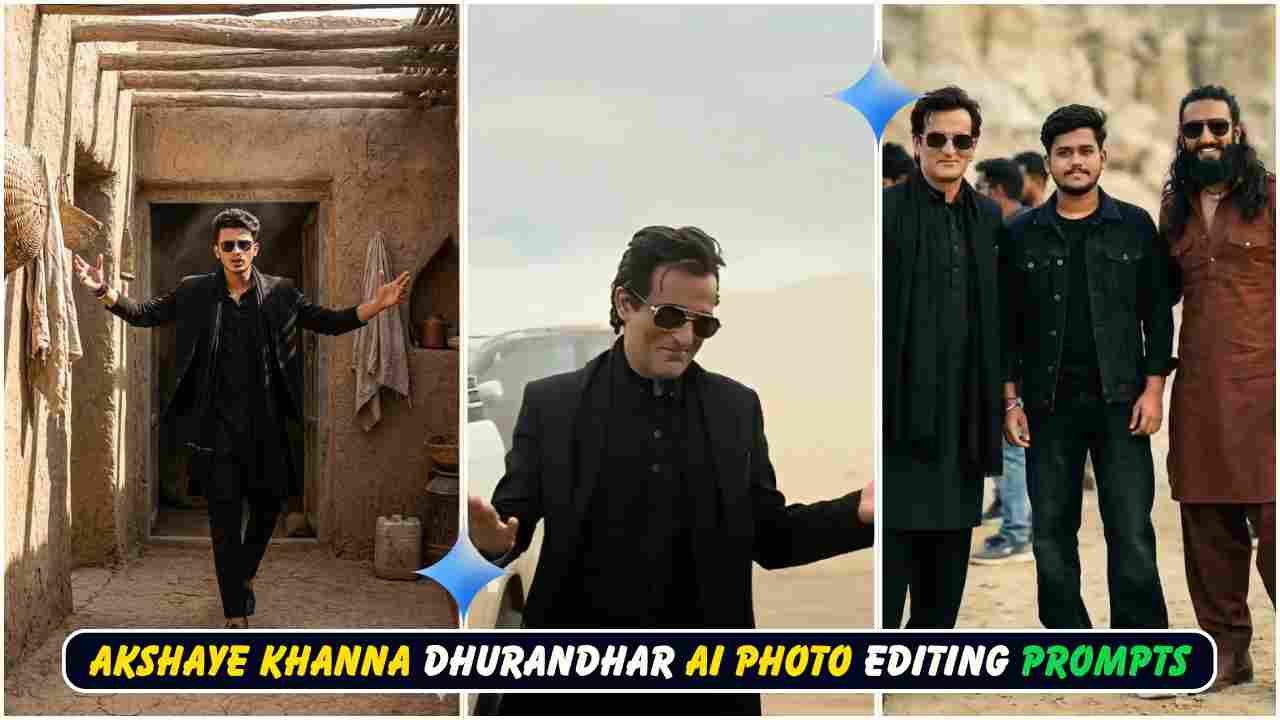
Google Gemini Rehman Dakait AI Photo Editing Prompt – Dhurandhar Prompt is a new trending topic among photo editors and Instagram creators. In this post, you will learn what this trend is, how it started, and how you can use these prompts to create your own viral Dhurandhar-style AI photos with a real, natural look. The language is kept simple so that anyone can understand and follow the steps easily.
What Is The Dhurandhar AI Photo Trend?
A new movie called Dhurandhar has recently been released, starring popular actors like Akshaye Khanna and Ranveer Singh. In this movie, Akshaye Khanna’s attitude-filled poses have become very popular, especially one scene where he stands with both arms stretched forward in a confident style. Many people are now using AI to create their own photos in a similar cinematic style and posting them on Instagram and other social media platforms.
Because the movie is trending, these AI-edited photos are also going viral very fast. Some people are making poster-type photos, some are creating behind-the-scenes (BTS) style photos with actors, and some are copying the exact iconic pose of Akshaye Khanna. The best part is that you can also create such photos easily at home using Google Gemini and some powerful AI photo editing prompts.
Who Is Rehman Dakait In This Trend?
In the Dhurandhar-inspired trend, “Rehman Dakait” is a kind of stylish, cinematic character look that people are trying to create with AI. The idea is to give yourself a powerful, gangster-style hero vibe, just like a character from a Bollywood movie. With the right prompt, you can turn your normal photo into a dramatic Rehman Dakait look while keeping your real face 100% the same.
The Rehman Dakait prompt focuses on attitude, costume, background, and cinematic lighting. It makes the image look like a real movie still, not like a cartoon or fake AI art. That is why this style is becoming popular among editors who want ultra-realistic results.
Akshaye Khanna Dhurandhar Ai Photo Editing Prompts
Rehman Dakait AI Photo Editing Prompt
Below is the main Rehman Dakait AI prompt you can use in Google Gemini. You just have to upload your photo and paste this prompt. Make sure you clearly tell the AI to keep your face 100% same as the reference image.
Rehman Dakait Prompt:
“A charismatic young man with dark, slicked-back hair and gold-rimmed aviator sunglasses. He is wearing a stylish black suit jacket over a black traditional shalwar kameez. He has a slight smirk and a confident expression, both hands open and gesturing outwards in a ‘what can you do?’ pose. He is standing in a dusty, empty desert or rocky mountain area. A luxury SUV is parked behind him. The background is dusty with soft clouds and muted beige colors. Cinematic lighting, shallow depth of field, realistic photography, 4K ultra-detailed, moody Bollywood movie scene, dramatic atmosphere, professional color grading. Preserve face 100%. I want the same face as my reference image, no change to my face.”
You can change small details like suit color or vehicle type if you want, but do not remove the lines about preserving your face. Those lines tell the AI to keep your real identity perfect.
Dhurandhar BTS Group Photo Prompt
If you want a behind-the-scenes style photo where you look like you are standing with other actors on the movie set, you can use this Dhurandhar BTS group photo prompt. This looks very realistic and feels like a real on-location film shoot.
Dhurandhar BTS Group Prompt (Simple English):
Hyper realistic 8k resolution, natural photo. A real behind-the-scenes film shoot photo from the movie “Dhurandhar”, outdoor location, daylight, natural cinematic lighting, shallow depth of field, realistic shadows, Three people standing together naturally. Center – Me: Face exactly same as my reference photo Outfit: black denim jacket, black t-shirt, black baggy jeans, chunky white sneakers. Slight smile, relaxed natural pose. Left side Actor 1: Face exactly same as reference image. Same hairstyle as reference. Outfit: black kurta, black pajama, black stole/scarf, black outer layer. Black rectangular sunglasses. Right side – Actor 2: Face exactly same as reference image. Same long hairstyle and same beard as reference. Outfit: brown traditional kurta and brown salwar. Brown boots. Black aviator sunglasses. All outfits, hairstyles and sunglasses must be exactly the same as reference images. all faces match refrences images
You can replace Actor 1 and Actor 2 with any actors or friends, as long as you also upload their reference photos to the AI.
Ranveer Singh & Akshaye Khanna BTS Portrait Prompt
This prompt is perfect if you want a portrait where you are standing between Ranveer Singh and Akshaye Khanna on the film set. It gives a very cinematic, fan-meets-star feeling.
Ranveer & Akshaye BTS Portrait (Simplified):
8K hyper-realistic daytime outdoor cinematic portrait on the shooting stage of the film “Dhurender”. Mid-body framing of all three, crisp natural daylight with warm highlights and soft film-set shadows. Pakistani outdoor shooting vibe with colorful tents, reflector boards, wooden carts, chai stall elements, and dusty textured ground. The user stands confidently in the center wearing black cargo pants and a black shirt with the top two chest buttons open, giving a stylish, relaxed hero presence. The user is posing with both hands casually resting in the cargo pockets, body slightly angled, smiling naturally toward the camera. On the user’s left, Ranveer Singh (in gray half-sleeve khandress) stands very close in a friendly manner, leaning slightly inward, giving a cheerful expressive smile. His rugged beard, voluminous slightly messy hair, and Dhurender-character attitude enhance the cinematic feel. On the user’s right, Akshay Khanna (wearing black kurta with a fitted black sadri
Vibrant Cultural Desert Dance Portrait Prompt
This prompt is for a more cultural and colorful look, mixing desert, dance, and traditional outfits with a strong hero center character.
Vibrant Desert Dance Prompt:
Full-body portrait of an 18-year-old young handsome man with a skinny body, lightly dancing in the center while walking forward in a bright daytime desert setting (Rath ki midan). He is wearing a pure black traditional kurta, a waist-length formal black coat (not long), and a thick plain black muffler resting naturally around the neck with no wrapping or twisting. Replace the face with MY FACE with 100% accuracy, matching lighting, shadows, angle, and realistic skin details. Add stylish black sunglasses. On both sides of him, very close, a lively Balochi group dressed in traditional white clothing with unique Balochi pagdhi (head turbans) is dancing joyfully. They should be dancing along with the main subject, matching his light dance steps, creating a culturally vibrant and energetic scene. Far behind (dūr), two Afghani men stand as bodyguards, each holding an AK47 in a controlled, non-aggressive stance. They should appear protective but not overpower the scene, keeping distance.
Candid Desert BTS Selfie Prompt
If you want a simple selfie-style image with Akshaye Khanna in a desert film set, use this prompt. It looks like a normal mobile selfie.
Candid BTS Selfie Prompt:
A realistic selfie shot taken by a young man standing next to Bollywood actor Akshaye Khanna in a desert environment. Akshaye Khanna is on the left, looking serious, wearing a black blazer over a black kurta, a black scarf wrapped around his neck, and gold-rimmed aviator sunglasses. He has slightly messy, windblown dark hair. The young man on the right is wearing a grey t-shirt and glasses, smiling at the camera. The background is a behind-the-scenes movie set in a sandy desert, with film crew members, technical equipment, lights, and black SUVs parked in the distance. Bright natural daylight, harsh shadows, 4k resolution, candid smartphone photography style.
Heroic Cinematic Entry Shot Prompt
This prompt creates a strong hero-entry style frame, like a movie introduction scene.
Heroic Entry Prompt:
A cinematic scene of a confident man walking forward. His face and hairstyle should match the reference image same hair as refrence image, mature facial structure, sharp jawline, and composed hero-like expression. He is wearing a black traditional outfit layered with a long black coat and sunglasses, making a signature hand gesture near his face while walking. Behind him, two men in rustic cultural attire follow slightly blurred for depth, and one elderly man in traditional turbaned clothing stands to his side. Dusty neutral background, desert-light ambience, soft warm tones, dramatic slow-motion atmosphere, 8K ultra-realism, cinematic color grading, heroic swagger and mass-appeal entry shot.
Cinematic Heroic Village Entry Prompt
This prompt is similar, but set inside an old village alleyway instead of open desert.
Village Entry Prompt:
A cinematic scene showing a confident man making a dramatic entrance in a rugged old village alleyway. His face and hairstyle should match the reference image same proportion, same hair as refrence image, natural shape and mature expression. He is wearing a black traditional outfit layered with a long black coat, sunglasses on, arms stretched wide as he walks forward with a charismatic smile. Behind him stand men dressed in cultural attire, blurred slightly to create depth. Harsh sunlight filters through wooden slats, casting striking patterned shadows on the walls and on his clothing. Dusty earthy textures, authentic environment, 8K ultra-realism, cinematic color grading, subtle motion, dramatic hero-entry atmosphere, powerful and bold vibe.
How To Create Dhurandhar Movie Scene Photos In Google Gemini
Now let’s talk in very simple steps so anyone can create these photos using the above prompts:
- Copy a Prompt
Choose any one of the prompts given above (Rehman Dakait, BTS, selfie, hero entry, etc.) and copy it. - Open Google Gemini
Click on your “Create Your Photo” button or directly open the Google Gemini website or app. Log in with your Google account. - Add Your Photo
Inside the image creation or editing section, you will see an option to add or upload a photo. Click on it and upload your clear face photo (and reference photos of actors if needed). - Paste The Prompt
Paste the copied prompt into the text box. Make sure lines like “Preserve face 100%” or “Face exactly same as reference” are included. - Enable Image Creation
If there is any toggle like “Create image” or similar, turn it on. Then send the prompt along with your photo to the AI. - Wait And Download
Wait a few seconds. The AI will generate your Dhurandhar-style scene. When the image looks good, click on it, download, and save it to your phone or PC.
If the first result is not perfect, you can try again or change small details in the prompt (like background, clothes, or pose) while keeping the face-preservation lines the same.
Why Are Dhurandhar Photos Going Viral?
This trend is going viral mainly because the movie Dhurandhar itself is very popular right now. Akshaye Khanna’s stylish pose with both hands extended forward has become iconic, and people love copying that attitude. When a few AI-edited photos in this style started getting millions of views and likes, more and more people began following the trend.
Another big reason is that AI tools like Google Gemini have made this type of editing very easy. Earlier, you needed advanced Photoshop skills to create such realistic movie-style images. Now, you just upload your picture, paste a prompt, and the AI does the hard work. People want a cinematic, hero-style look in their photos, and AI gives them exactly that with very little effort.
Final Words
Using the Google Gemini Rehman Dakait AI Photo Editing Prompt and the other Dhurandhar prompts above, you can easily create your own viral movie-style images. Just follow the simple steps, use a clear reference photo, and always include instructions to keep your face 100% real and unchanged. If you like this kind of content, you can experiment with more poses, more BTS scenes, and different outfits to build a full Dhurandhar-style photo set for your Instagram or YouTube thumbnails.
Learn More:

