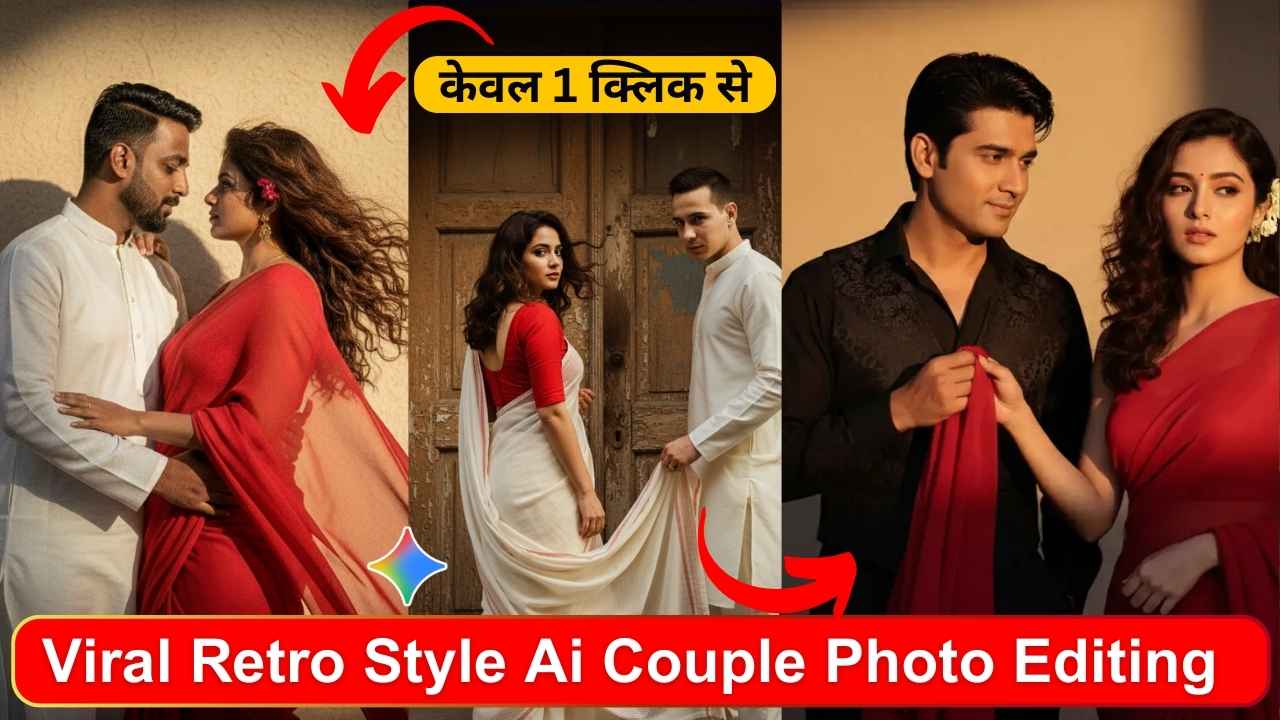
Gemini Retro Style Ai Couple Photo Editing Prompt- Transform your modern couple photos into timeless, vintage masterpieces with the latest viral trend: Gemini’s Retro Style AI photo editing. This technology lets you and your partner step back in time, creating nostalgic and cinematic portraits with just a few clicks. Whether you’re aiming for the grainy feel of a ’70s film still or the dreamy haze of a ’60s snapshot, AI-powered prompts make it simple to produce stunning, shareable art.
This guide will walk you through everything you need to know, from the step-by-step process to a list of over 20 viral prompts to get you started.
How to Create Your Retro Masterpiece
Creating a retro-style couple photo with Gemini is a straightforward process. Follow these simple steps to begin your journey into vintage-inspired photo editing :
- Access Gemini: Open the Gemini AI application on your device or navigate to the Gemini website. You will need to log in with a Google account to proceed.
- Upload Your Photo: Select and upload a clear, well-lit photograph of you and your partner. You can also upload two separate images to merge them.
- Choose and Paste a Prompt: Copy a detailed prompt that describes the retro style you want to achieve. Paste it into the text box provided.
- Generate the Image: Click the “Generate” or “Edit” button and let the AI work its magic, transforming your photo based on the prompt.
- Refine and Download: Review the generated image. If it’s not quite right, you can adjust the prompt to refine details like colors, contrast, or lighting and generate again. Once you are happy with the result, download your new vintage-style photo to save or share on social media.
20+ Viral Gemini Retro Style AI Prompts
Here are over 20 prompts you can copy and paste to create your own viral retro couple photos. These prompts cover various decades and aesthetics, from classic Bollywood romance to groovy ’60s vibes.
Cinematic & Romantic Prompts
- Prompt 1: Create a retro, vintage-inspired image – grainy yet bright – based on the reference picture. The girl should be draped in a perfect red, Pinterest-style aesthetic retro saree, and the guy should be wearing a white kurta with a Pinterest-style Chinese collar in a retro look. The vibe must capture the essence of a 90s movie, with the girl having wavy curls and a small flower tucked visibly into her hair, enhanced by a windy, romantic atmosphere. The guy should be holding her waist and looking deep into her eyes. They stand against a solid wall, where deep shadows and dramatic contrasts add mystery and artistry to the scene, creating a moody yet enchanting cinematic effect.youtube
- Prompt 2: A romantic close-up of a couple against a plain wall—she in a red saree with wavy curls, he in a white kurta—bathed in dramatic light and shadow.
- Prompt 3: Turn this image into a retro, vintage-inspired cinematic portrait of a couple sitting together on a rustic wooden bench in a breezy outdoor setting.youtube
- Prompt 4: A walking-glance-back scene featuring a woman in an off-white saree with a red blouse, her partner holding her saree pallu against an old wooden door with moody shadows.
- Prompt 5: Create a retro, vintage-inspired image – grainy yet radiant – of a couple in a romantic pose. The girl is draped in a deep purple saree.
Decade-Specific Prompts
- Prompt 6 (1950s): Turn this couple photo into a 1950s Polaroid with soft borders, faded blues, and a slight yellow tint for a retro vibe.
- Prompt 7 (1960s): Transform this couple selfie into a 1960s groovy style with vibrant yet faded colors and a dreamy haze.
- Prompt 8 (1960s): Give our outdoor shot a retro psychedelic edit, including swirly patterns and soft focus edges.
- Prompt 9 (1960s): Edit this kiss photo like a 60s album cover, with bold contrasts and a vintage color wash.
- Prompt 10 (1970s): Make this dancing couple pic look like a 1970s disco snapshot, with glittery highlights and warm amber tones.
- Prompt 11 (1970s): Apply a retro disco filter to our fun pose, adding lens flares and a grainy texture.
- Prompt 12 (1980s): Edit our couple shot to 1980s neon vibes, with bright highlights, dark shadows, and a VHS glitch effect.
Polaroid & Instant Film Prompts
- Prompt 13: Edit our smiling pose to mimic an old instant camera shot, adding light leaks and vintage scratches.
- Prompt 14: Apply a mid-century filter to this hug photo, with warm tones and subtle grain for that nostalgic feel.
- Prompt 15: Turn this embrace into a 70s-style Polaroid, complete with faded edges and vibrant pops of color.
- Prompt 16: Transform my photo into a vintage Polaroid with soft white borders and warm tones.
Creative & Artistic Prompts
- Prompt 17: The girl is sitting on a wooden bench reading a book, and the guy is adjusting her hair while looking at her. The vibe must capture the essence of a 90s movie with a dark brown-haired baddie, a white flower in her hair, and a windy, romantic atmosphere. Create a moody cinematic effect with flying maple leaves.youtube
- Prompt 18: Couple riding a bike on an open highway with wind in their hair.
- Prompt 19: A young Indian man with a retro vibe is standing barefoot indoors against a plain beige wall with dramatic sunlight casting angular shadows. He has slightly messy hair and a subtle beard, wearing a tucked-in beige short-sleeve polo shirt paired with high-waisted brown pleated trousers. The warm golden light and soft grain effect enhance the cinematic vintage mood.
- Prompt 20: An Indian man is leaning casually against a vintage white Ambassador car. He is wearing a light floral printed half-sleeve shirt with olive green trousers. The background features a dry rural landscape under warm sunlight, enhancing the nostalgic vintage atmosphere.
- Prompt 21: A cinematic outdoor portrait of a stylish young man confidently standing against a black Yamaha RX100 motorcycle. The background features overgrown greenery and a weathered concrete wall, giving a rustic, urban vibe.
How to Get the Best Results
To create truly stunning retro images, keep these tips in mind :
- Be Specific The more detailed your prompt, the better the result. Mention clothing styles, color palettes, specific decades (e.g., ’70s, ’90s), props, and background elements.
- Use Mood Words Incorporate words like “nostalgic,” “cinematic,” “grainy,” “sepia,” or “Kodachrome” to help the AI understand the desired aesthetic.
- Refine Your Edits Don’t hesitate to ask Gemini to tweak the image. You can request softer light, more contrast, or other specific vintage effects to perfect the final look.
- Use Descriptive Language Instead of just using keywords, write descriptive sentences that paint a clear picture of the scene you envision.
A crucial aspect to consider is privacy. Remember that AI tools often process your images online. Be cautious about sharing personal photos with identifiable faces or locations. To stay safe, avoid using images with sensitive details like home addresses, and consider blurring personal information if necessary.
Learn More: How to Convert Ghibli Art AI Photo to Ghibli Art AI Video with a Single Prompt
Conclusion
The Gemini AI retro photo trend offers a fun and accessible way for couples to creatively re-imagine their moments together. By blending modern technology with timeless aesthetics, you can easily produce beautiful, vintage-style portraits perfect for anniversaries, social media, or simply as a romantic keepsake. With the right prompts and a bit of creativity, you can turn any photo into a nostalgic work of art.

