
Studio Ghibli’s enchanting, dreamworld art has long inspired generations of artists. And now, thanks to the innovative power of Grok AI, you can create a breathtaking Ghibli-inspired portrait with a single, high-quality prompt. In this tutorial, we will guide you through the process step by step, learning about the art style and how to create effective prompts, all while taking advantage of the ease and strength of Grok AI.
What is Grok AI?
Grok AI is a sophisticated artistic tool that leverages artificial intelligence to turn text inputs into works of visual art. Whether you’re a seasoned digital artist or a beginner, Grok AI provides an easy means of exploring new styles. Its easy-to-use interface and robust algorithms allow you to create your artistic vision with minimal effort.
Understanding the Ghibli Art Style
Studio Ghibli is renowned for its richly detailed, atmospheric, and emotive art. Key characteristics include:
- Whimsical landscapes: Soft, lush backgrounds with a touch of fantasy.
- Expressive characters: Delicate facial expressions that tell a story.
- Warm color palettes: Pastel tones and gentle lighting that evoke nostalgia and wonder.
By capturing these elements, your portrait can embody the unique charm that defines Ghibli’s visual storytelling.
Why Use a Single Prompt?
With one well-crafted prompt, you simplify your creative workflow. Rather than dealing with multiple environments or back-and-forth tweaks, you can:
- Save time: Quickly generate artwork without overcomplicating the process.
- Maintain creative focus: Let your vision guide the AI to produce consistent results.
- Experiment freely: Adjust the prompt on the fly for different nuances of the Ghibli style.
Step-by-Step Guide to Creating Your Ghibli-Style Portrait
1. Define Your Vision
Before diving into prompt creation, spend a few moments visualizing the portrait:
- Mood and Atmosphere: Do you want a serene forest scene, a magical twilight, or an urban fantasy setting?
- Character Details: Consider the subject’s expression, attire, and the story they might tell.
- Background Elements: Think about natural elements—like soft mist, ancient trees, or sparkling rivers—that are often found in Ghibli films.
2. Crafting Your Single Prompt
The key to success is in the details. Here’s an example of a comprehensive prompt:
“A whimsical portrait in Ghibli style featuring a serene character with expressive, gentle eyes, set against a lush, enchanted forest with soft pastel lighting and intricate natural details.”
This prompt combines clear instructions with artistic descriptors, guiding Grok AI to generate an artwork that embodies the classic Ghibli aesthetic.
3. Inputting the Prompt into Grok AI
- Open Grok AI: Launch the application and navigate to the prompt input section.
- Paste Your Prompt: Enter your carefully crafted single prompt.
- Generate Artwork: Click the generate button and let Grok AI work its magic.
4. Reviewing and Refining the Output
Once Grok AI creates your portrait:
- Evaluate the Details: Check if the image captures the delicate nuances of the Ghibli style.
- Make Adjustments: If necessary, tweak your prompt—altering descriptors or adding subtle details—to better align with your vision.
- Experiment: Don’t hesitate to try different variations of your prompt to see how slight changes affect the final result.
5. Final Touches and Sharing Your Artwork
After you’re satisfied with the generated portrait:
- Enhance Manually: Use your favorite editing software for any fine-tuning.
- Share Your Creation: Post your work on social media or art communities, inviting feedback from fellow enthusiasts.
- Document Your Process: Share your prompt and workflow to inspire others in the creative community.

How to create a Ghibli-style portrait using Grok AI
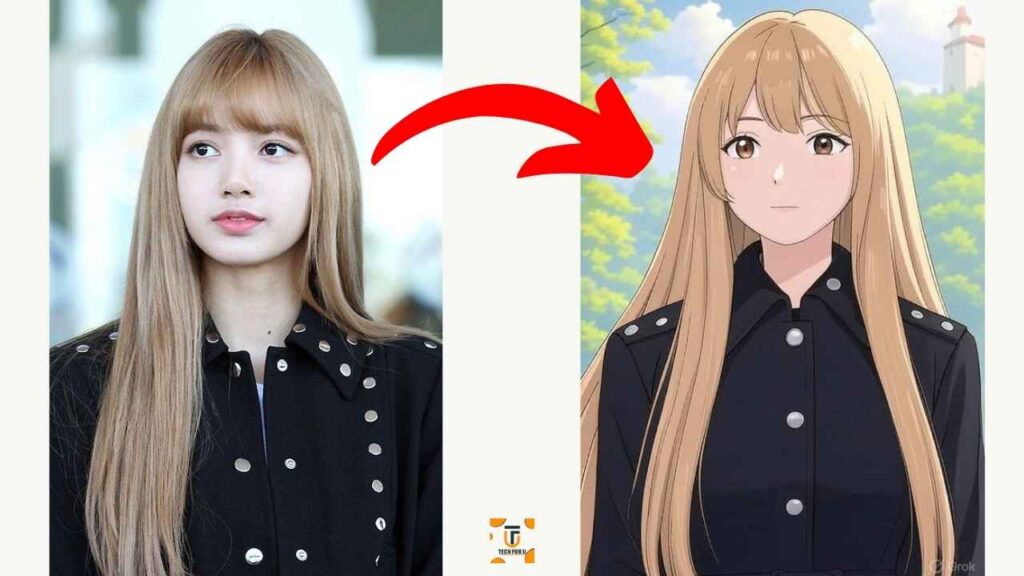
You can directly create a Ghibli-style portrait using Grok AI by following our video tutorials below.
Prompt: Convert the image into a Ghibli-style portrait.
Convert the image into Ghibli studio art
Tips for a Perfect Ghibli-Style Portrait
- Be Specific: The more detailed your prompt, the closer the result will be to your vision.
- Experiment Boldly: Try out various adjectives and imagery to capture that perfect Ghibli ambiance.
- Learn from the Masters: Revisit your favorite Studio Ghibli films to understand what makes their art so captivating.
Conclusion
Making a Ghibli-portrait in Grok AI with one prompt is a game-changing method of merging old-school artistry with new-age technology. With a very precise prompt and faith in the potential of AI, it becomes easy for you to create art that captures the spirit and soul of Studio Ghibli. Get creative and let your imagination fly using Grok AI!

