
Building a website has historically been a time-consuming process, typically involving technical skills and many resources. Also, hiring a developer can be too expensive. However, with the evolution of artificial intelligence (AI), the process has become easier and more efficient.
AI-based website builders, such as Hostinger’s AI Website Builder, allow users to build professional websites quickly, usually 10 times quicker than conventional methods. In this ultimate guide, we will take you through the steps to build a website with AI, give examples, offer tips for designing an awesome site, and discuss other AI website builders.
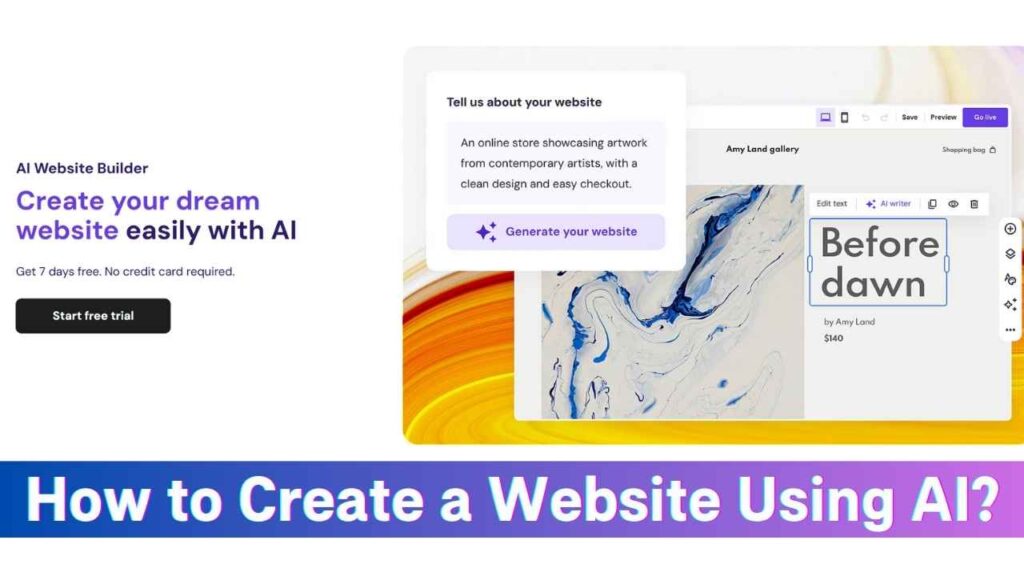
How to Build a Website with AI?
Using AI to develop your website makes it easy to achieve in just a few simple steps. This is how you can do it with Hostinger’s AI Website Builder:
Step 1: Visit Hostinger Website Builder and Choose a Plan
Start by going to the Hostinger AI Website Builder page. Hostinger has different plans suited for different purposes, such as personal blogs, business websites, and online shops. Check out the features of each plan to see which best suits your purpose.
Step 2: Purchase a Plan
Once you have chosen a plan, go ahead and buy it. Hostinger usually gives promotion discounts, so watch for any current deals. The payment process is straightforward, walking you through account sign-up and checkout.
Step 3: Log in to Hostinger and Create a New Site
Once you’ve made your purchase, sign in to your Hostinger account. Under your dashboard, there is a button that says “Create a New Site.” Clicking this button will automatically start the process of making a website through AI.
Step 4: Choose a Hosting Plan and Connect Domain
As part of the site building process, you will be asked to choose a hosting plan if you have not already. You can also link an existing domain or acquire a new one. Hostinger’s platform makes it convenient to manage domains, and you can easily match your website’s address to your brand.
Step 5: Describe Your Website
The AI will prompt you to describe your website’s content and purpose briefly. By giving a proper description, you allow the AI to create specific content and design elements that speak to your intended audience. If you’re designing an online store for handcrafted items, say what kind of products, the ethos of your brand, and any design specificity.
Step 6: Edit the Website
After the AI creates your site, you can further customize it. Hostinger’s easy-to-use drag-and-drop editor lets you tweak layouts, change content, and add more features. This gives your website not only the look you had in mind but the ability to grow with your changing needs.
Some Examples of AI Websites
To show the flexibility of AI-created websites, here are a few examples:
1) Online Store (Brushstroke)
Brushstroke is an e-commerce site that deals with handmade painting materials. The AI website creator made a beautiful website that features items with good photos, descriptions, and a built-in shopping cart for easy transactions.
2) Landing Page (Pawsitive Pups)
Pawsitive Pups provides dog training and needed an enticing landing page to generate leads. The AI-created website includes captivating imagery, straightforward calls-to-action, and a contact form that successfully converts traffic into clients.
3) Business Website (TechFix)
TechFix offers technical repair services and needed a credible online presence. The AI builder created a website showcasing their services, testimonials, and a simple appointment scheduling system that improved user experience and credibility.

Tips for Creating a Stunning Website
To maximize the potential of your AI-generated website, consider the following tips:
1) Write Detailed Prompts
When describing your website to the AI, include comprehensive details about your business, target audience, and design preferences. The more information you provide, the better the AI can tailor the site to your needs.
2) Use Different Images
Include a mix of high-quality images that best describe your brand. Visual variety keeps visitors interested and shows professionalism.
3) Write Better Content
While the AI may produce starting content, it is essential to polish it to fit your brand’s voice and messaging. Properly written content boosts SEO and connects more effectively with your audience.

Hostinger AI Website Builder Alternatives
Although Hostinger includes a powerful AI website builder, checking out options can offer different features or modes of user interface. A considerable option is:
ZipWP is a website builder driven by AI focusing on speed and ease of use. It presents a variety of templates and styling options, to serve users with effective website design without sacrificing performance.
Conclusion
AI has transformed the process of creating websites, making it more accessible and convenient. Tools such as Hostinger’s AI Website Builder enable users to create professional websites quickly, freeing them up to concentrate more on content and strategy than technicalities.
With the steps provided in this guide and the tips offered, you can leverage AI to create a website that not only serves your purposes but also makes an impact in the digital world.


