
Google AdSense has been a popular choice among publishers for years due to its simplicity and robust monetization features. With the introduction of Offerwall Ads, publishers are now able to access a new source of revenue by rewarding users for interacting with ads. In this guide, we will take you through setting up and optimizing Offerwall Ads on your site so that you can get the most out of your revenue potential in 2025.
What are Google AdSense Offerwall Ads?
Offerwall Ads are a rewarded ad format introduced by Google AdSense. Rather than standard banner ads, these ads present users with an option: watch an ad or take another action to receive additional content or extended site access. They are intended to deliver value to publishers and users alike, increasing revenue and user engagement.
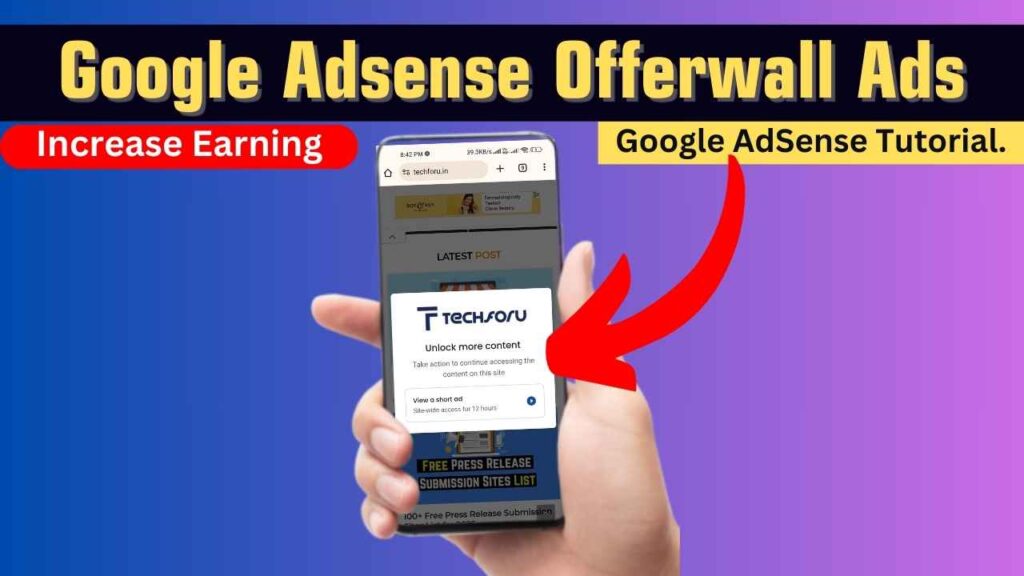
How Do Offerwall Ads Work?
The process of Offerwall Ads is simple. With it enabled, your site visitors are offered a notice telling them to look at a rewarded ad. As a reward, they get rewarded with something like increased access to your content. The process involves:
- Triggering the Offerwall: Once a user fulfills certain conditions (such as a predetermined number of page views), the Offerwall message is displayed.
- User Engagement: Users may opt to view a rewarded ad, with rewards received instantly.
- Revenue Generation: Such engagements typically lead to increased CPMs and higher overall revenue than standard display advertising.

Step-by-Step Guide to Setting Up Offerwall Ads
Here’s how to create your Offerwall Ads in Google AdSense:
1. Log in and Go to Privacy & Messaging
- Access Your Account: Start by logging into your Google AdSense account.
- Go to Privacy & Messaging: Locate the “Privacy & messaging” tab in your dashboard, where all message types—including Offerwall Ads—are controlled.
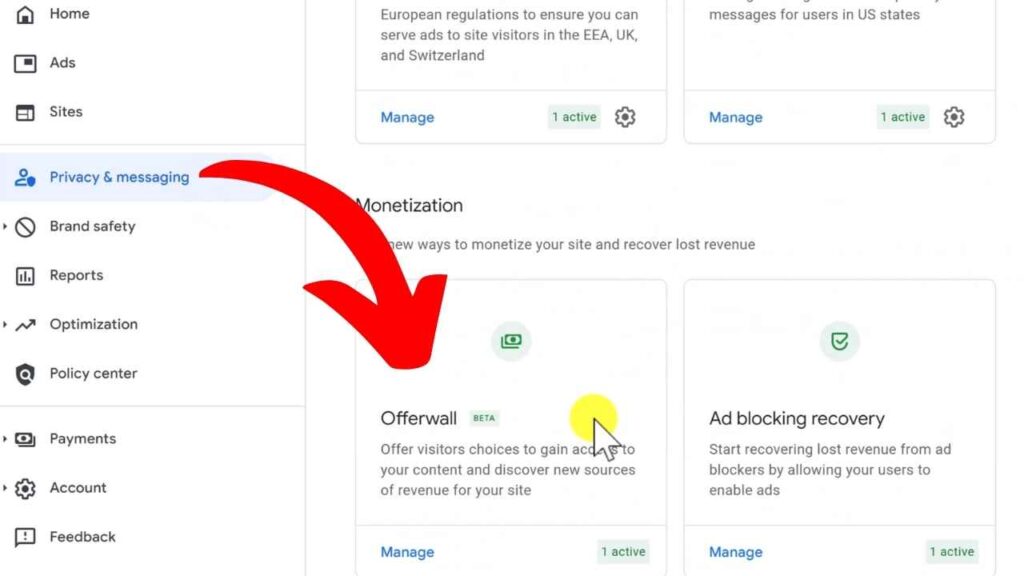
2. Create Your Offerwall Message
- Initiate Creation: Click on the “Create” link under the Offerwall section.
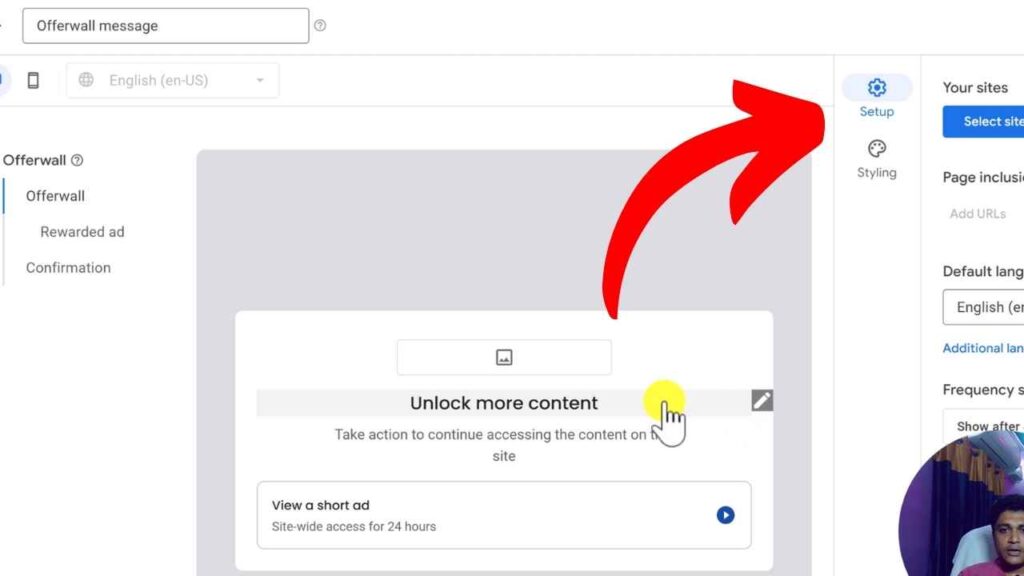
- Define Your Message: Provide a name for your Offerwall ad. Personalize the message by including your site’s logo, a short description, and user instructions.
- Select Sites and Pages: Choose the particular sites or pages where you wish the Offerwall to be displayed. Depending on your content strategy, you can include or exclude pages.
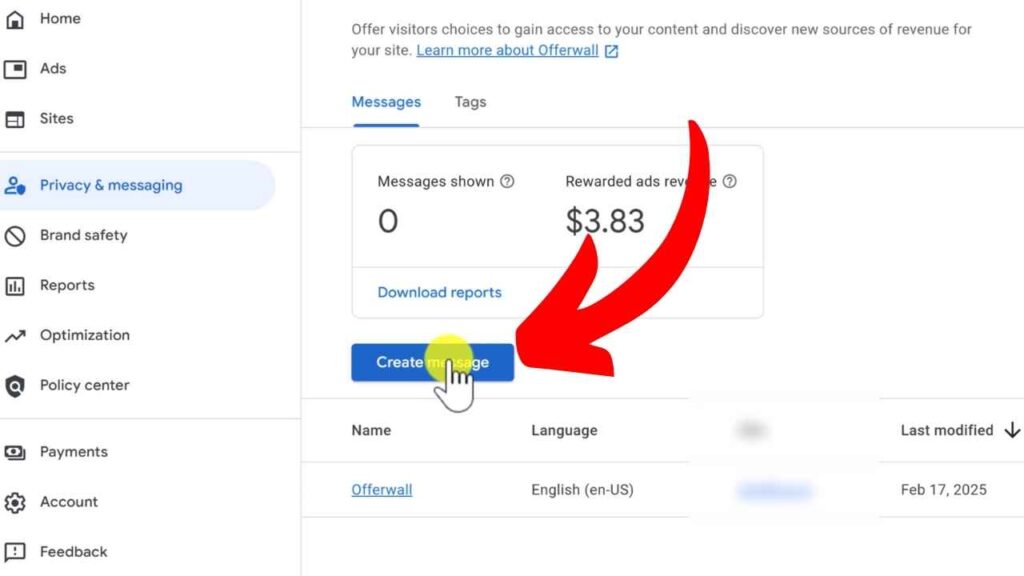
3. Customize Your Ad Settings
- Frequency Settings: Adjust how often the Offerwall appears. For example, set it to trigger after a defined number of page views.
- User Choices: Configure the reward options that users receive. Options typically include extended access to content or additional page views after watching a short ad.
- Styling: Upload your logo and tweak the text to align with your brand’s voice. Preview the final look using the provided message builder.
4. Publish and Monitor Performance
- Publish Your Offerwall: Once you’re satisfied with the setup, hit the “Publish” button. The Offerwall will automatically display using your existing AdSense ad tag.
- Monitor Metrics: Use AdSense’s metrics card and CSV reports to track impressions, user engagement, and revenue. Monitor key metrics such as rewarded ad completions and page views with ad entitlements.

Best Practices and Tips
Maximizing the potential of Offerwall Ads requires attention to detail. Consider these tips:
- Optimize Frequency: Balance user experience and revenue. Avoid overwhelming users with too many prompts.
- Clear Communication: Make sure the reward and the process are communicated. Users should know exactly what they get in return for viewing an ad.
- Design Consistency: Ensure your Offerwall message matches your site’s overall branding and aesthetics.
- Test and Iterate: Conduct A/B testing to try various messages, frequency settings, and reward types and determine what works best.
- Ad Blocker Awareness: Because Offerwall messages may be intercepted by ad blockers, use fallback alternatives or let your users know about the advantages of disabling ad blockers on your website.

Pros and Cons of Offerwall Ads
Pros
- Higher CPM: Rewarded ads typically yield higher earnings.
- Enhanced Engagement: Offerwall Ads provide a more interactive experience that can keep users on your site longer.
- Customizability: The ability to tweak frequency, rewards, and styling offers flexibility.
- Increased Revenue Opportunities: Additional monetization without being too intrusive.
Cons
- User Opt-Out Risk: If not implemented carefully, users may choose to leave the site instead of engaging.
- Ad Blocker Interference: Offerwall messages won’t display if an ad blocker is enabled.
- Limited Customization: Some advanced users may find customization options less robust than other ad formats.
- Occasional Inconsistencies: There might be occasional issues with reward tracking or ad display consistency.

Future Trends in Offerwall Advertising
As digital advertising evolves, so will the tools at a publisher’s disposal. In 2025:
- Enhanced AI Optimization: Expect better AI-driven recommendations for reward offers and frequency adjustments.
- Deeper Analytics Integration: Improved data analytics will provide more granular insights into user behavior and ad performance.
- Cross-Platform Consistency: With more users on mobile and tablet devices, Offerwall Ads will become more adaptive to various platforms.
- Innovative User Engagement: Future updates may introduce interactive elements that further gamify the ad experience.
Conclusion
Google AdSense Offerwall Ads provide a new and profitable means of monetizing your site in 2025. With increased CPMs, engaging user interactions, and a highly customizable installation, these ads have the potential to greatly increase your earnings when properly implemented. But like with any monetization feature, thoughtful planning, testing, and optimization are necessary. Utilize this guide as a beginning point to test Offerwall Ads, monitor performance, and iterate on your audience’s behavior.

FAQs: The Ultimate Google Adsense Offerwall Ads Guide You’ll Need in 2025
What exactly are Offerwall Ads?
Offerwall Ads are a type of rewarded ad that allows users to unlock extra content or extended access by viewing a short ad.
How do I set up Offerwall Ads in Google AdSense?
Log into your AdSense account, navigate to the “Privacy & messaging” section, and follow the steps to create and customize your Offerwall message.
Can I control how often the Offerwall appears?
Yes, you can adjust the frequency settings to control after how many page views the Offerwall should appear.
What are some best practices for using Offerwall Ads?
Optimize frequency, communicate rewards clearly, maintain design consistency, and continuously test to improve engagement.
Are there any downsides to using Offerwall Ads?
Some potential challenges include user opt-out risk, interference from ad blockers, and occasional tracking inconsistencies.

